69 lines
1.6 KiB
Markdown
69 lines
1.6 KiB
Markdown
---
|
||
title: 同一台设备Python兼容
|
||
date: 2020-06-06 21:52:21
|
||
tags: [Python]
|
||
categories: [Python]
|
||
author: Anges黎梦
|
||
---
|
||
> 在同一台电脑上如何同时安装Python2和Python3,且均可以正常使用pip。
|
||
|
||
## 一、百度版本
|
||
|
||
在Python安装目录中,寻找python.exe和pip.exe,并修改python.exe和pip.exe的文件名修改了。
|
||
|
||
但是这样的方法其实还是不完美。pip的版本容易冲突,经常导致只有一个pip可以使用。
|
||
|
||
并不是很稳定
|
||
|
||
## 二、官方版本
|
||
|
||
### 1. Windows
|
||
|
||
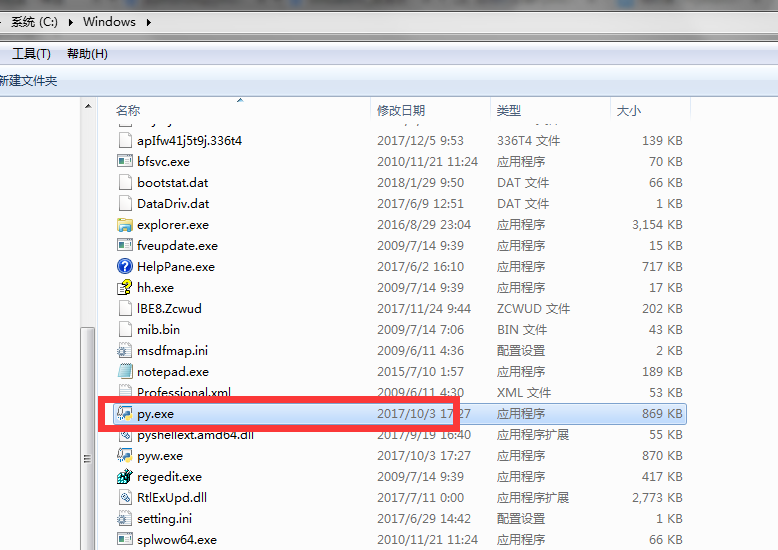
安装Python版本,且版本在3.x版本以上时。
|
||
|
||
我们可以在C盘,Windows目录下,寻找py.exe文件(安装Python自动安装)。
|
||
|
||
|
||
|
||
#### 使用方式
|
||
|
||
##### 1. Python 2.x
|
||
```
|
||
py -2
|
||
py -2 -m pip install xxxx
|
||
```
|
||
##### 2. Python 3.x
|
||
```
|
||
py -3
|
||
py -3 -m pip install xxxx
|
||
```
|
||
|
||
这样运行python文件的时候就会比较麻烦,解决方法就是我们可以在文件头,声明一下运行python版本,声明格式如下:
|
||
|
||
```#! python2```
|
||
|
||
```#! python3```
|
||
|
||
python的版本声明在文件中是要放在第一位的。
|
||
|
||
### 2. Mac
|
||
Mac系统本身自带了2.x的Python版本
|
||
虽然说有方案可以卸载。但是尽量不要卸载。
|
||
因为系统中有一些内容是要依赖python的。卸载容易造成系统异常或其他问题。
|
||
|
||
在Mac电脑中,想要使用多个python,直接在命令行中使用命令就可以区分。
|
||
|
||
#### 1. Python 2.x
|
||
启动python
|
||
```
|
||
python2
|
||
```
|
||
使用python2版本的pip
|
||
```
|
||
pip2
|
||
```
|
||
|
||
### 3. Linux
|
||
|
||
Linux上与Mac使用相同
|